
Instructor Onboarding 🔍
This guide explains how instructors at UIC can request access to use AI TA in their classes.
Step 1: Request Access
Section titled “Step 1: Request Access”Visit the Instructor Access Request Form on the site and fill it out with the following details:
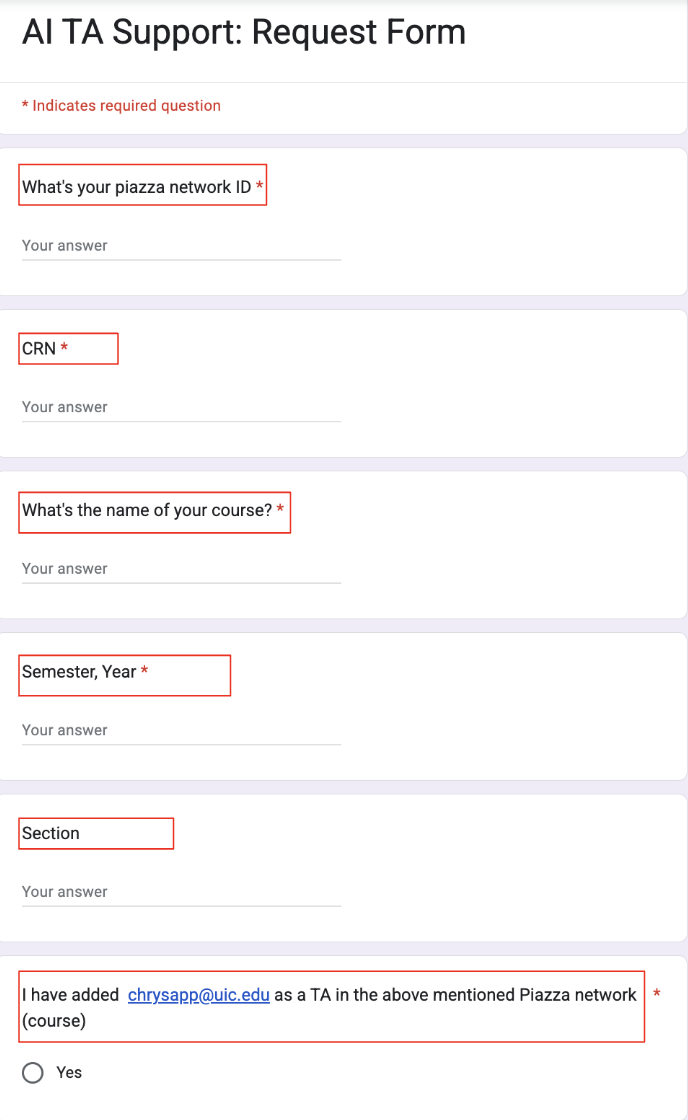
- Enter your Piazza Network ID, which can be found in the URL of your Piazza class page

-
Enter the Course Registration Number (CRN) for your class
-
Enter the Course Name (e.g., “Introduction to Computer Science”)
-
Enter the current semester and year (e.g., “Fall 2025”)
-
Enter the class section (e.g., “SQK”)
-
Important: Check “Yes” ONLY if you have already added
chrysapp@uic.eduas a TA to your Piazza class
This form is restricted to @uic.edu accounts to ensure that only verified UIC instructors can submit a request.
Step 2: Confirmation
Section titled “Step 2: Confirmation”Once setup is complete:
-
You’ll receive a confirmation email
-
The model will be ready for student and instructor use